Chengshi 中文

Screens tour

One feature per section, each with a real screen from the app. It starts with the Tomorrow page you will open most, then the chart, Ask, People, Places, lessons and check-ins.

The screens show demo data: the boss, Kai and Manager Wang are sample people.

The app's screens are in Traditional Chinese only for now. More languages will come later.

明天 Tomorrow

Two energy numbers

“The day on its own” counts only the day and the month; “within this year” adds the year and your ten-year luck period. The faded part of the twenty-step bar is what the year and luck period take off. Xiaoqi's face and the tip follow the first number.
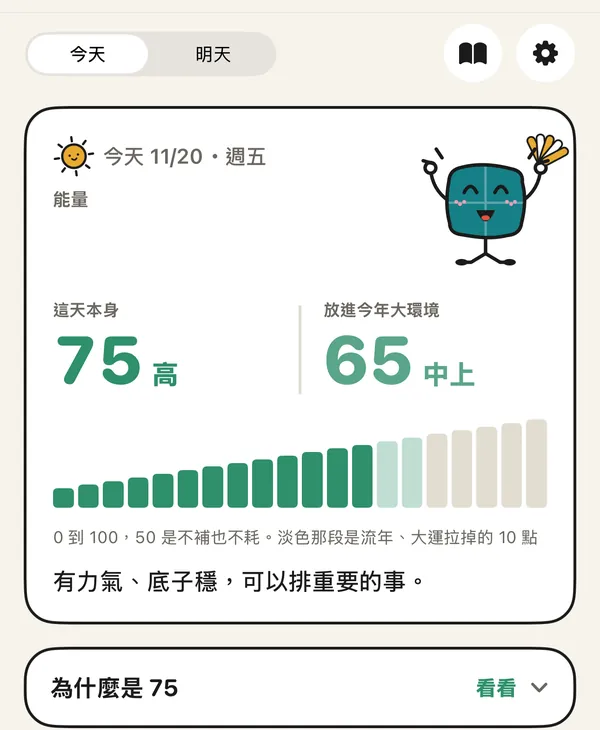
Tomorrow page: 75 (high) for the day on its own, 65 (good) within this year, a twenty-step energy bar and a “why 75” row

Why this score

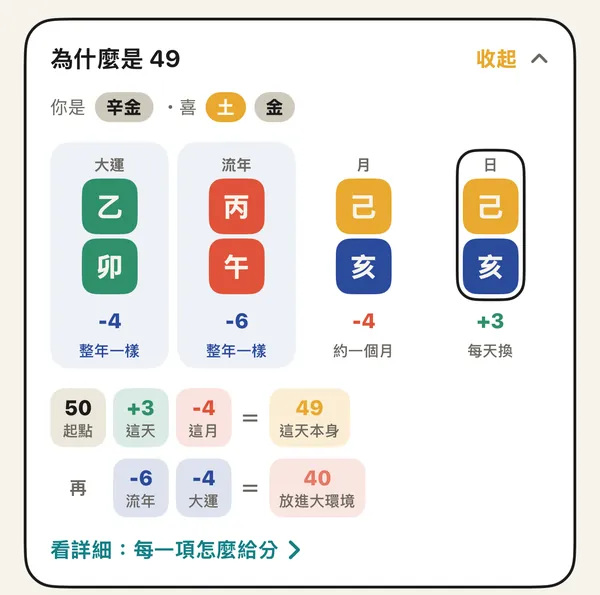
Tap “why” for the luck period, year, month and day pillars as five-element colour blocks, each with its points and how often it changes. Then a two-line sum: 50 plus the day and month gives the day on its own; add the year and luck period for the day within this year.

“Why 49” opened: four colour blocks for the luck period 乙卯, year 丙午, month 己亥 and day 己亥, marked −4, −6, −4 and +3, above a two-line sum

How energy is worked out

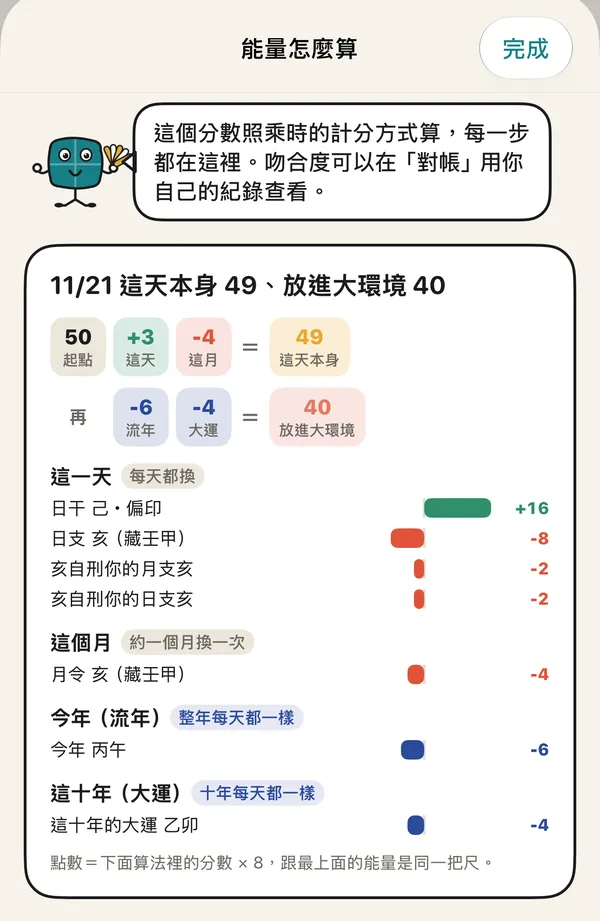
Open it from “details”. Every item has a bar and its points, grouped by day, month, year and decade. Below is the full method: your day master and favourable elements, the weight of each pillar, clashes and combinations, and where the levels are cut.

The energy method page: the sums 49 and 40, then each item listed with its points for the day stem, day branch, month, year and luck period

The twelve-period dial, with “now”

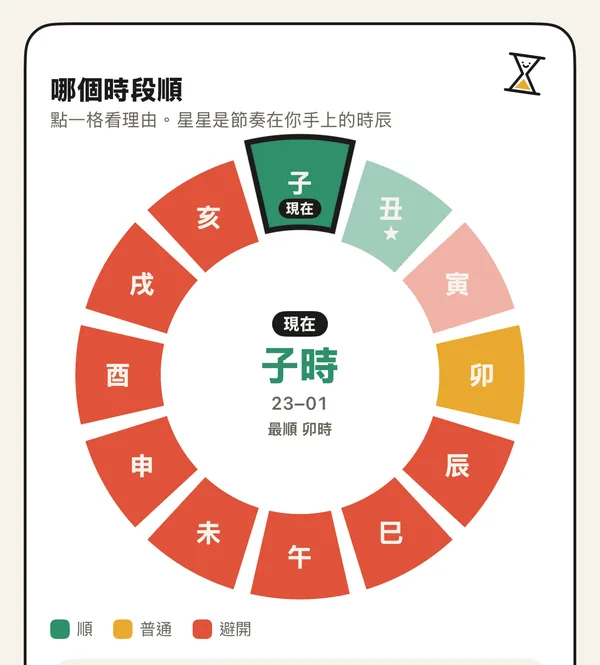
Each period gets a colour: good, neutral, avoid. The current one is marked “now”, and the centre names it and the best period. After 23:00 the 子 period belongs to tomorrow's chart.

The round twelve-period dial with 子 marked “now”, the centre showing 子時 23–01 and the best period, periods coloured green, yellow and red

排盤 Chart

Nine palaces, south at the top

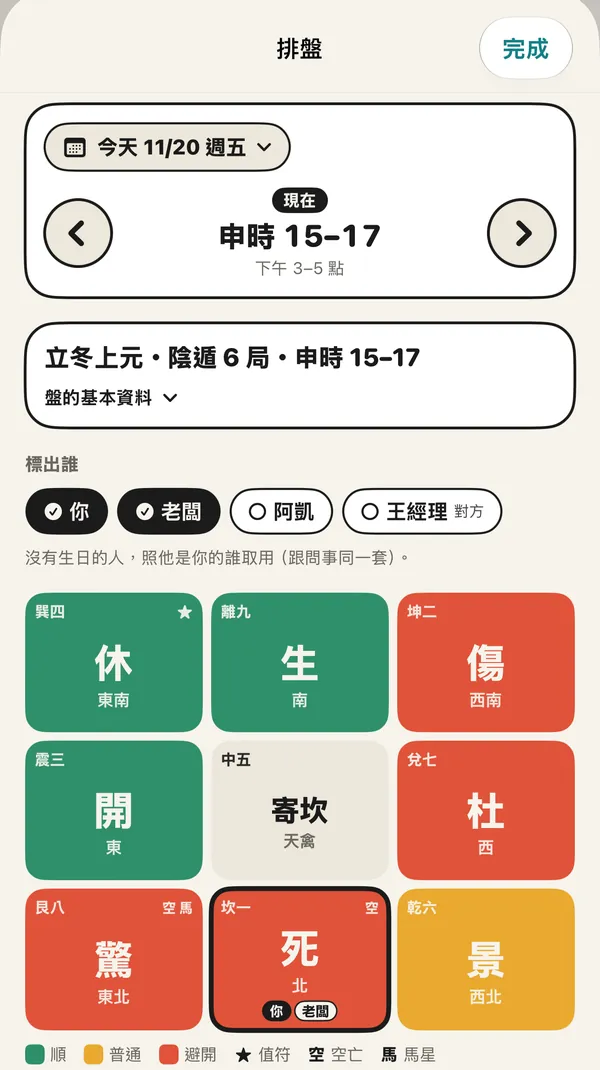
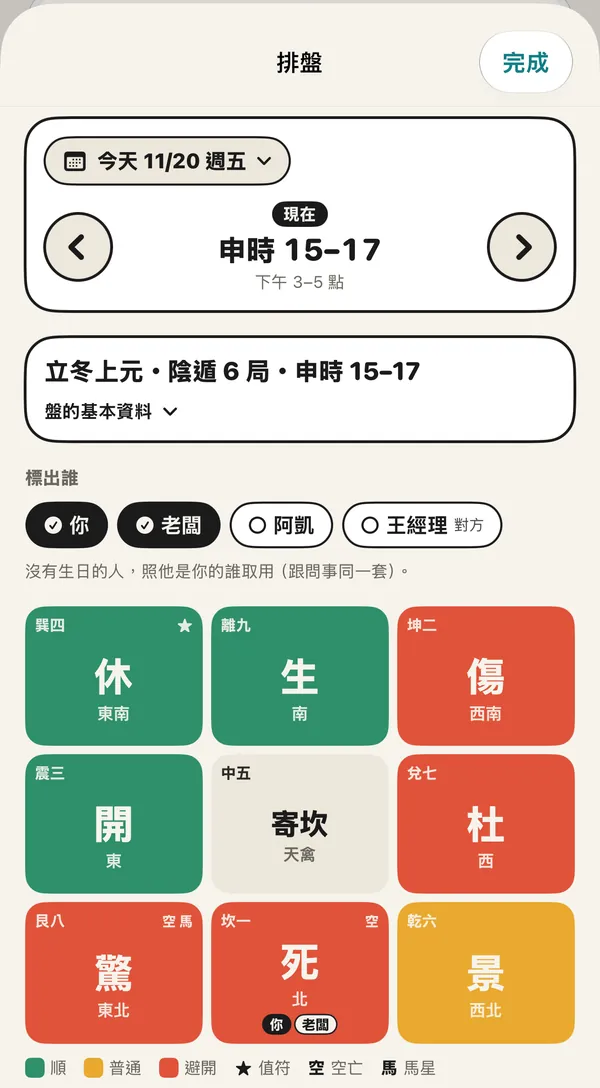
The traditional layout with south at the top. Colours follow the eight doors' classes; a star marks the chief (值符), 空 and 馬 mark void and horse star. Switch the hour and date at the top: today and tomorrow are free, other dates are Pro. Pick below whom to mark; people without a birth date are placed by their role.

The chart page: today 20 Nov, 申 period 15–17, yin dun ju 6, nine coloured palaces, you and the boss marked in the Kan palace

Open a palace

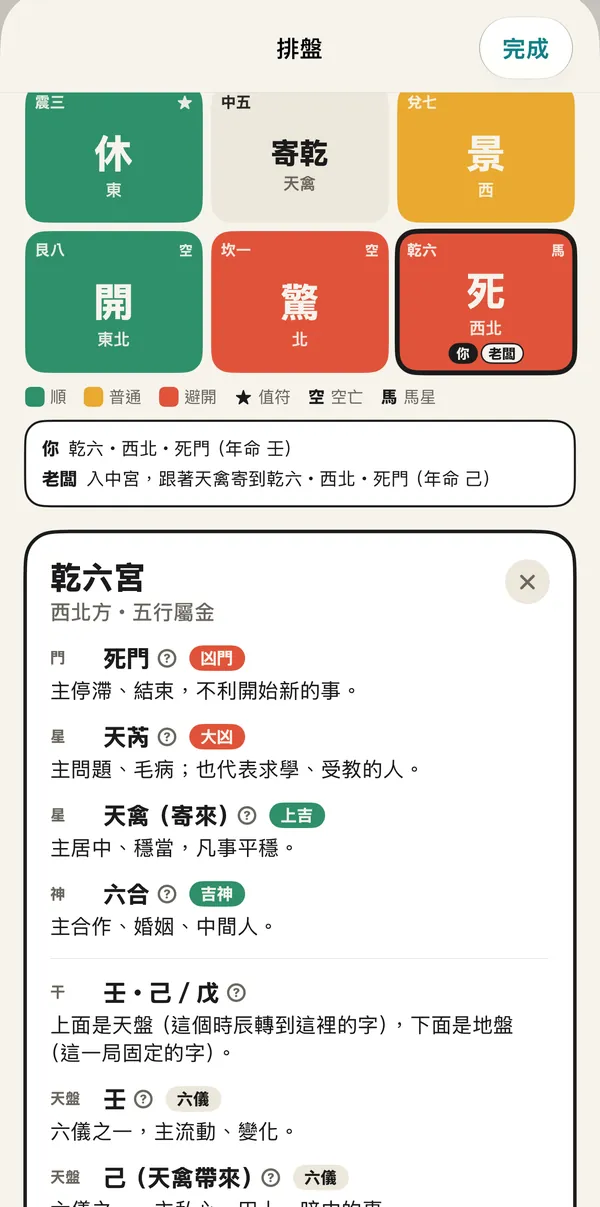
An open palace lists its door, star and spirit, the heaven and earth stems, and markers such as void, horse star, door clash, punishment and tomb. Each has a tag and a plain sentence; the question mark explains the term.

The Qian palace opened: Death door, the star Tianrui, Tianqin carried in, the spirit Liuhe, and the heaven stem 壬 over the earth stem 己

問事 Ask

One folder per matter

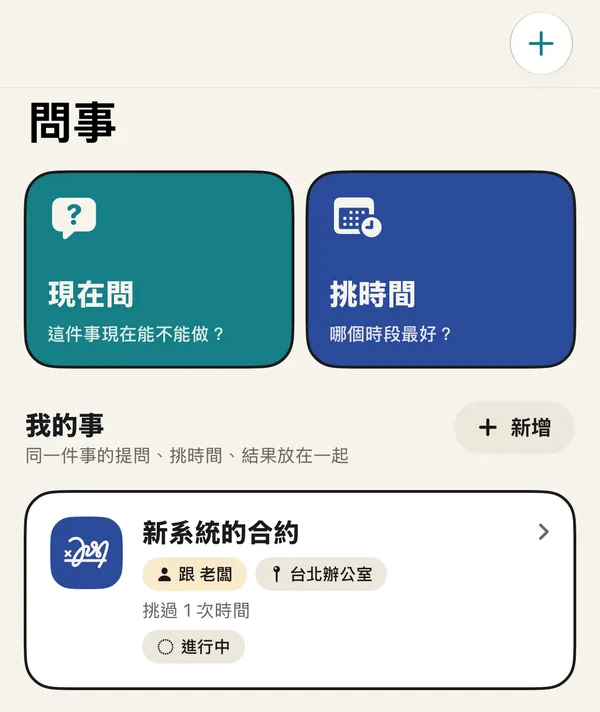
Each matter is a folder for what you asked, the times you picked and how it went, with who and where. Two ways in at the top: Ask now and Pick a time.

The Ask page: “Ask now” and “Pick a time” buttons above a matter folder for a new system contract, with the boss, at the Taipei office

Ask now

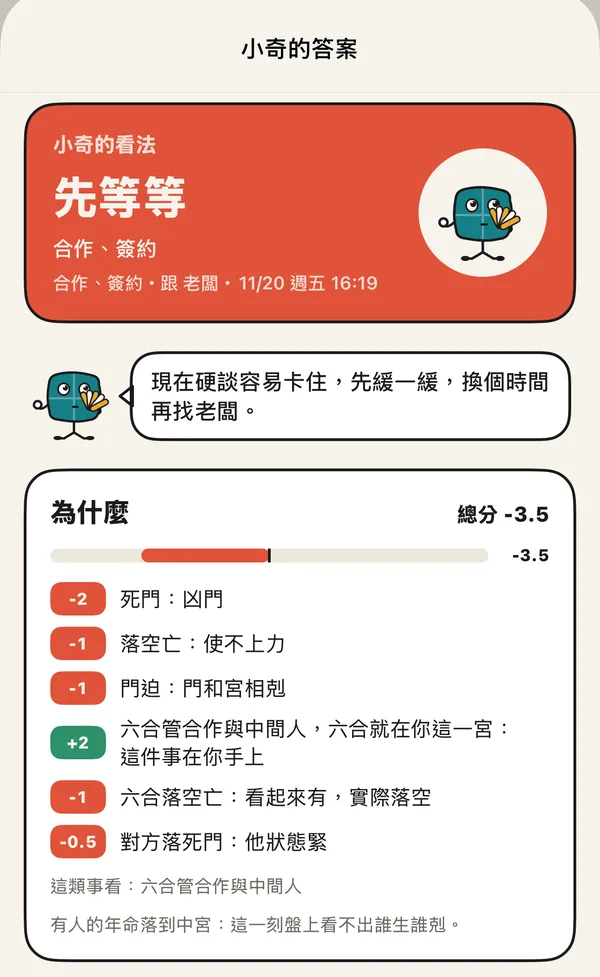
The chart is cast for the moment you tap. Xiaoqi gives a one-line view, then every plus and minus and what this kind of matter looks at. Asking the same thing again in the same period gives the same answer.

Xiaoqi's answer: wait a little, for a contract with the boss; the reasons list Death door −2, void −1, door clash −1, Liuhe +2 and more

The full chart for that moment

Open the full chart from the answer and you get the chart for the moment you asked, the same one the answer used, with you and the other person marked.

The chart page opened from Ask now: the 申 period's nine palaces with you and the boss marked

人 People

The people around you

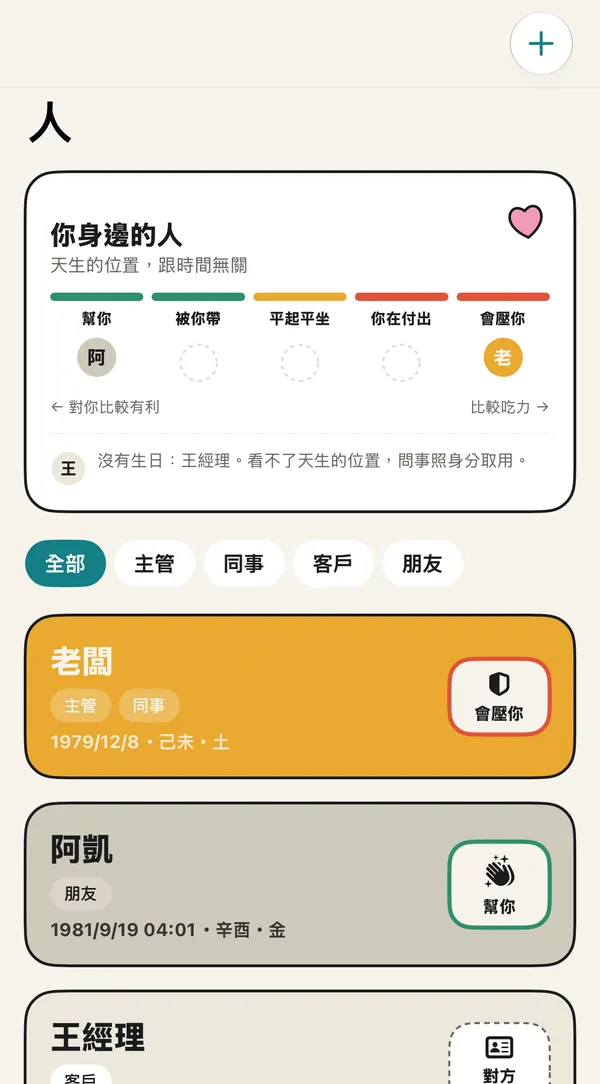
A scale at the top shows where each person sits with you: helps you, you lead them, even, you give more, leans on you. With a birth year they are read by their birth-year stem; without one, by their role.

The People page: a five-step scale, then the boss (leans on you), Kai (helps you) and Manager Wang (no birth date, placed by role)

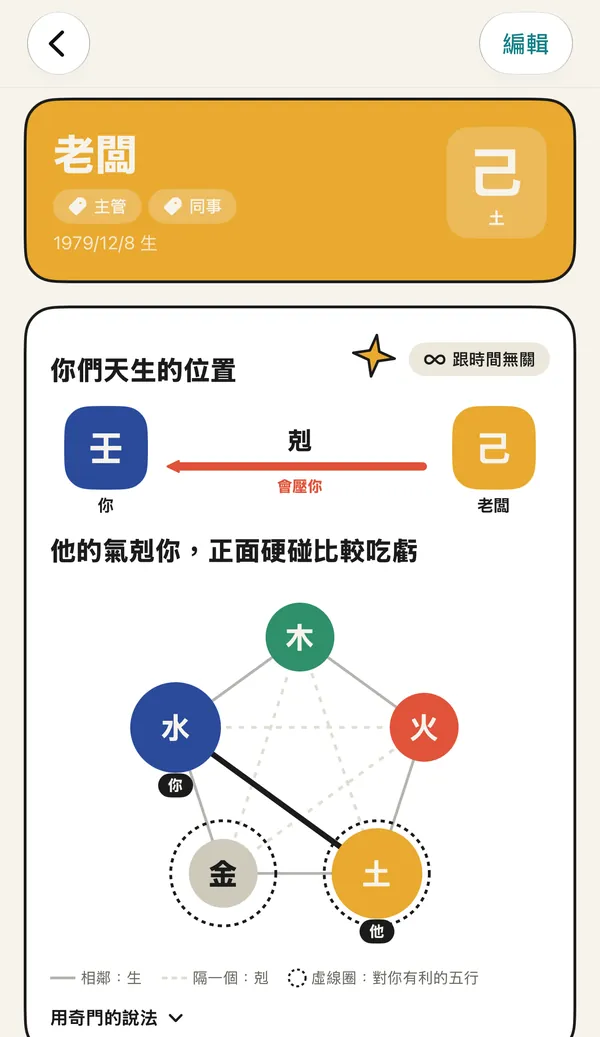
Where you stand by birth

Open a person to see how your birth-year elements produce or overcome each other, with one plain sentence. This does not change with time.

The boss's page: you are 壬 water and the boss is 己 earth; earth overcomes water, drawn on a five-element diagram

When to talk to them

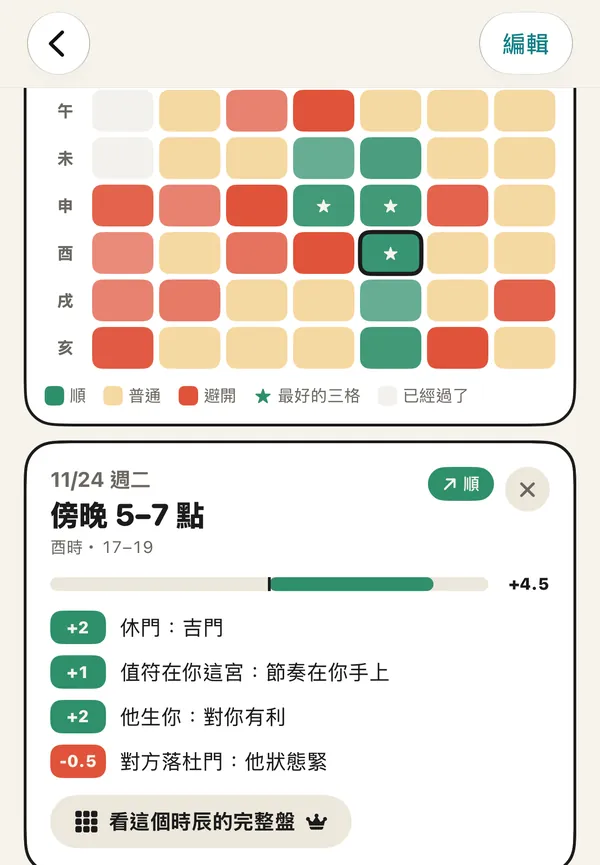
One cell per period for the week, coloured by how it goes, with stars on the best three. Tap a cell for its pluses and minuses, then open that period's full chart; charts beyond today and tomorrow are Pro.

The weekly heatmap and an open slot card for Tue 24 Nov, 17–19, with Rest door +2, chief in your palace +1, they support you +2, and a button for the full chart

地 Places

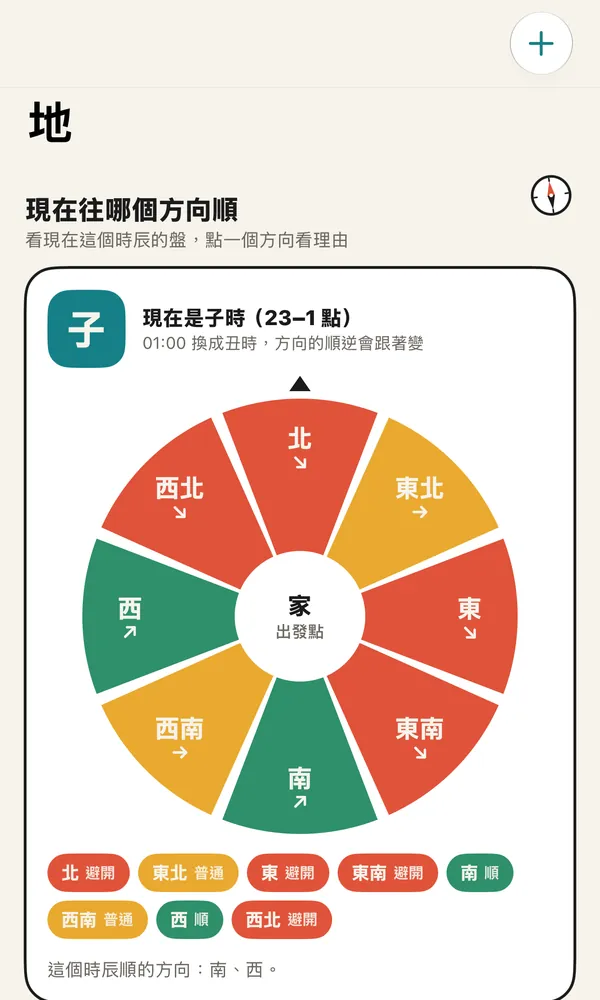
Which direction suits now

Save the places you go. Chengshi works out their direction and distance from your starting point. The dial reads the chart for the current period and marks all eight directions good, neutral or avoid; it changes with the period.

The Places page: an eight-direction dial around home, with south and west good and north, east, south-east and north-west to avoid

Lessons

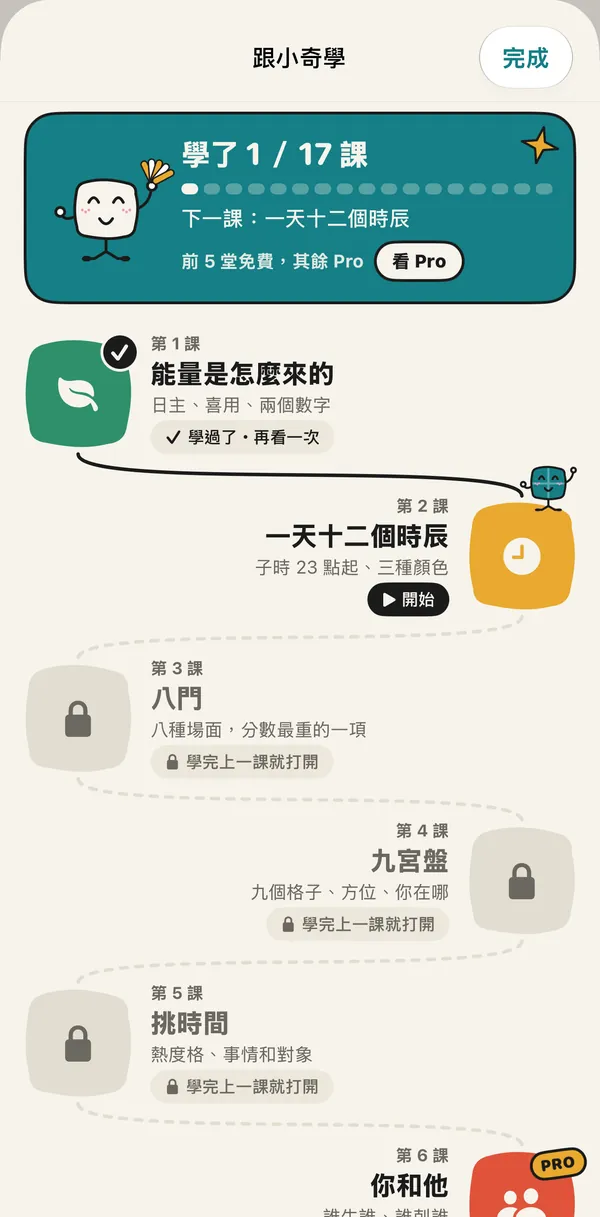
A path of seventeen lessons

One topic per lesson, from where energy comes from, the twelve periods, the eight doors and the nine palaces, to the ten gods, nine stars, eight spirits and luck periods. The first five are free; lesson six on is Pro.

The lesson path: 1 of 17 done, lesson 1 on energy and lesson 2 on the twelve periods open, later lessons locked

Lessons on your real chart

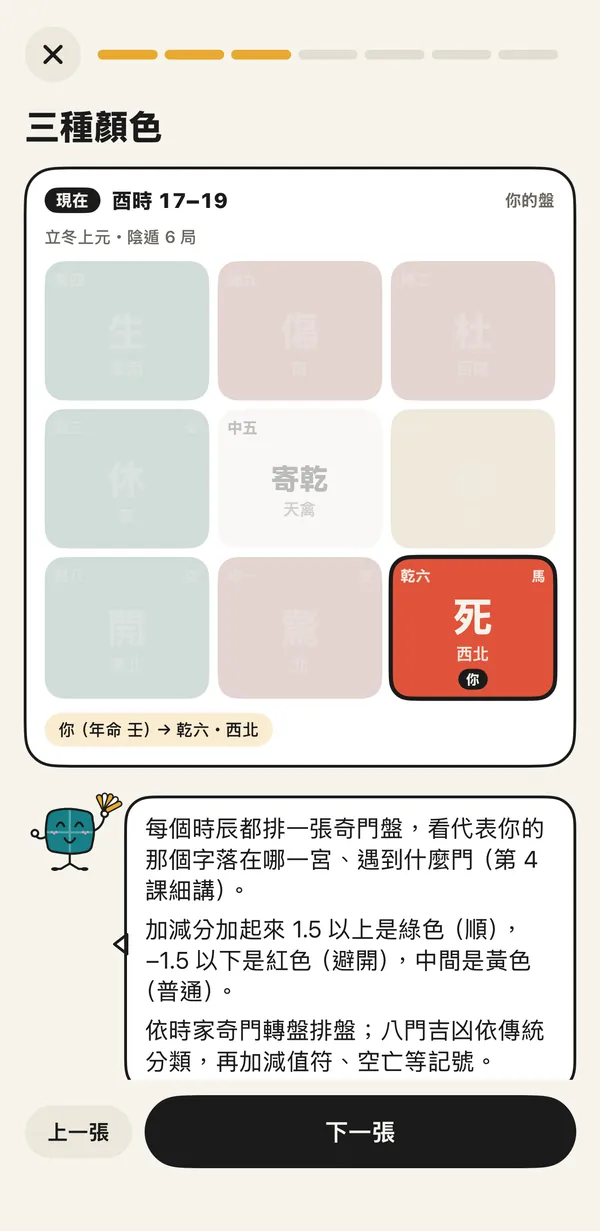
Cards about the chart use your chart for this moment: the palaces in focus light up, the rest fade, and Xiaoqi explains in a speech bubble below.

The lesson card “three colours”: the 酉 period's chart with only the Qian palace lit, and Xiaoqi explaining green, yellow and red

對帳 Check-ins

Progress bar and conclusions

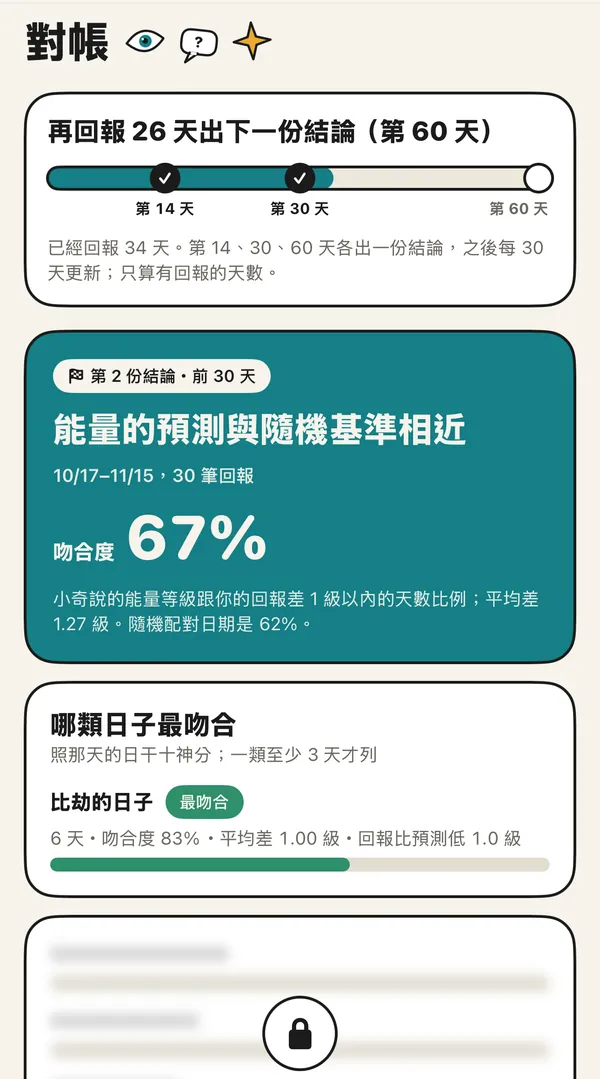
The bar shows how many more check-ins until the next conclusion: one at 14, 30 and 60, then every 30. Free shows the headline, the overall match and the best-matching kind of day; the rest is Pro.

The check-in page: 26 more days to the next conclusion on a bar marked 14, 30 and 60; the second conclusion shows a 67% match, the rest locked

The full conclusion

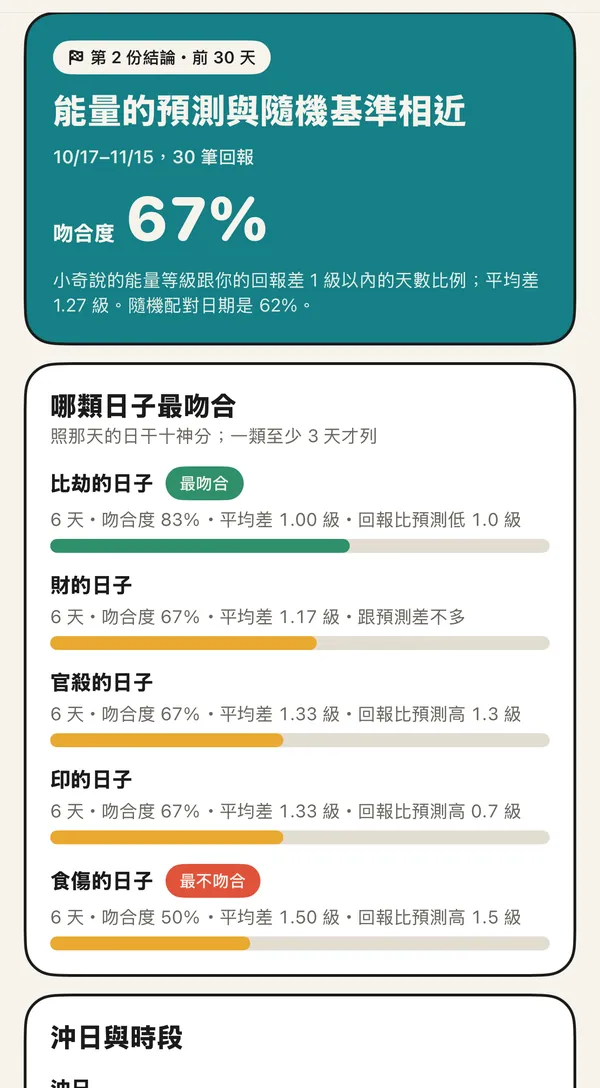
The overall match sits next to a chance baseline from shuffled dates. Below, kinds of days (印, 比劫, 財, 官殺, 食傷, plus clash days) are ranked from best to worst match, with the hit rate of the best periods.

The full conclusion: 67% match against 62% for shuffled dates; 比劫 days match best at 83%, 食傷 days least at 50%

Element suggestions, only when you apply

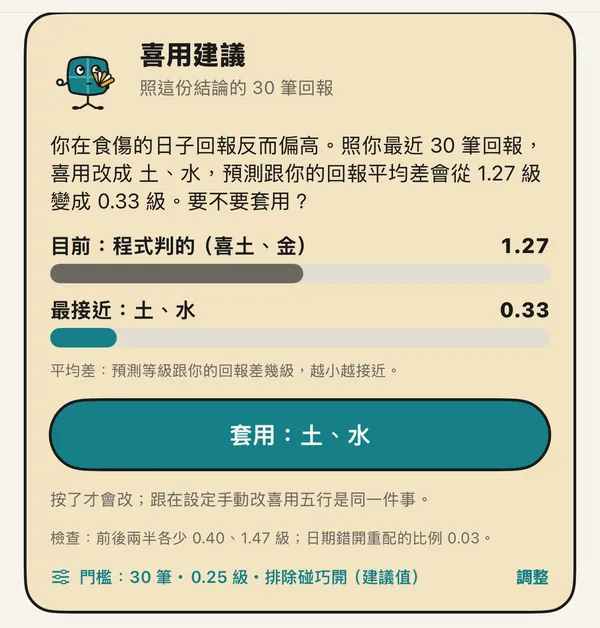
With enough check-ins and a clear enough gap, Xiaoqi suggests a different set of favourable elements and shows the difference. Nothing changes until you tap Apply, and you can switch back; check-ins before and after are compared separately. The thresholds are in Settings; the recommended values are 30 check-ins, 0.25 levels, and the chance check on.

The suggestion card: current earth and metal at 1.27 levels apart, closest earth and water at 0.33, an “Apply: earth, water” button, thresholds 30 / 0.25 / chance check on

Worked out on your phone

Check-in conclusions, element suggestions and every chart are computed on your iPhone. None of it is sent anywhere.

iPhone app, coming soon to the App Store

Back to the Chengshi home page