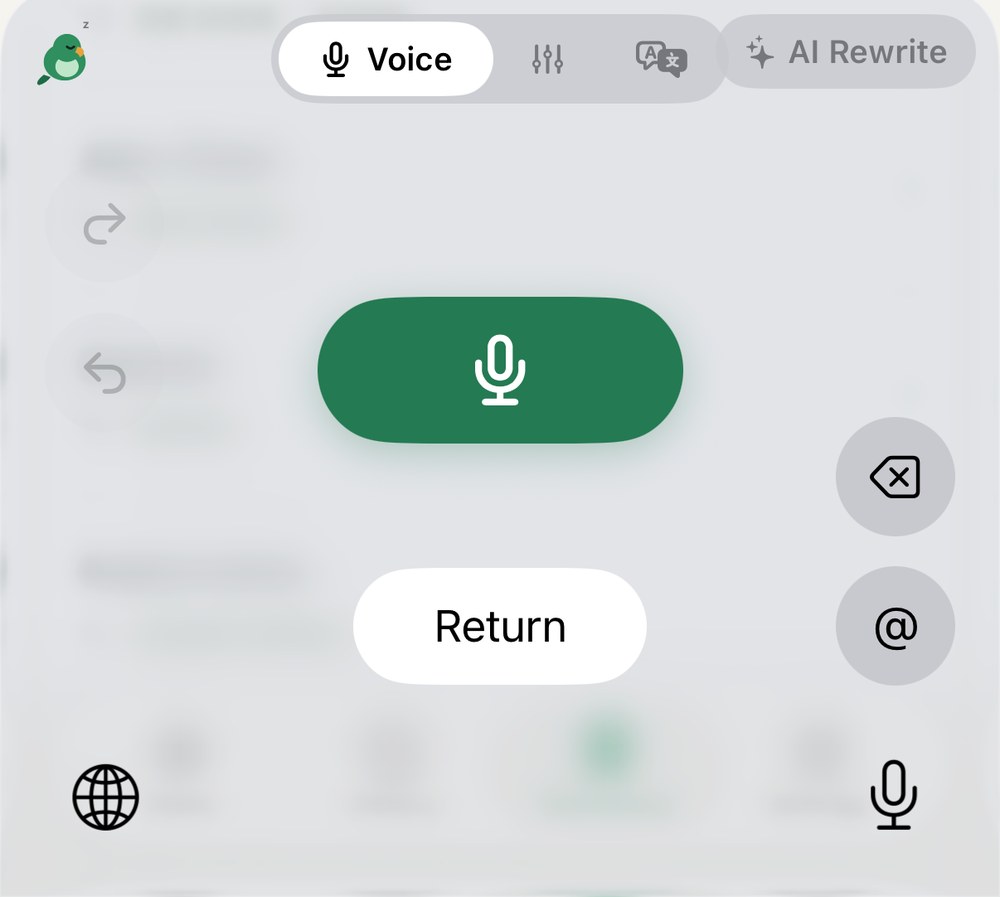
In Messages, Mail or WhatsApp, switch to the Parroting keyboard and tap the mic. When you stop talking, clean text lands in the text field.
Scan with your iPhone camera to open the App Store
US$4.99, one-time, no subscriptioniOS 26 or laterNo account, ads or tracking
Word for word, as spokenWorks without AI
remember to buy milk and eggs and then we’re out of bread too and also pay the phone billremember to buy milk and eggs and then we’re out of bread too and also pay the phone bill
Cleaned up by Parroting✦ List
1.Buy milk, eggs, bread
2.Pay the phone bill
Same words. Pick a rewrite style once, and every sentence is tidied up before it’s pasted.
If you can type there, you can talk there
Parroting is a keyboard. No switching apps, no copy and paste — just switch keyboards wherever you’re typing.
While you talk, the keyboard shows two buttons: “Done” pastes what you said; the colored one tidies it up in your chosen rewrite style first.
Filler words
The “um”s stay out
Pauses and verbal tics are removed before anything is pasted.
“Um, so tomorrow’s 3 pm team meeting moves to 4, okay, and, like, same room”
Tomorrow’s 3 pm team meeting moves to 4, same room.
Mid-sentence changes
Change your mind out loud
No need to delete and start over. Only what you meant in the end is kept.
“Let’s meet tomorrow, uh, no wait, Thursday at two, actually three, yeah”
Let’s meet Thursday at three.
Email format
One spoken line becomes an email
Greeting and sign-off are added for you; your signature comes from My Info.
“I’ll send the quote later, the last version had errors so don’t use it, need a reply by Friday”
Hi,
I’ll send the quote shortly. The previous version contained errors, so please don’t use it. Could you reply by Friday? Thank you.
Alex Wang
Make it a list
Ramble in, get 1, 2, 3 out
A long run of to-dos becomes a tidy list.
“Bring your ID for Saturday’s trip, and then we meet at the station at 8 am, oh and remember water and an umbrella”
1. Bring your ID
2. Meet at the station, 8 am
3. Water and an umbrella
Tone fix
Too blunt? It softens it first
Same meaning, phrased so the other person can hear it.
“This report is full of mistakes, did you even check it”
A few parts of this report need fixing — could you check it once more?
Built-in styles: Tone fix, Email format, Make it a list — or add your own. Examples are illustrative; actual results depend on the AI you choose.
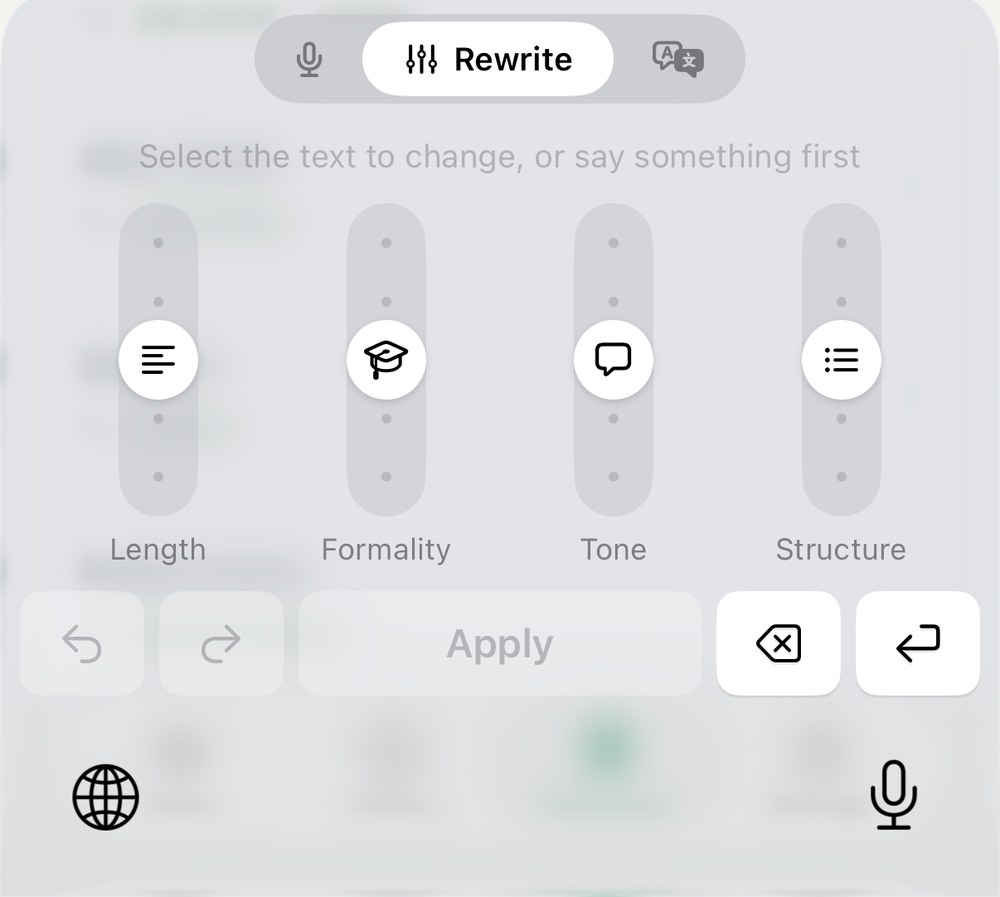
Rewrite
Adjust text you’ve already written.
Rewrite sliders
Four sliders, set just right
Select text, adjust length, formality, tone and lists, then tap Apply.
Original
I’ll get you the stuff tomorrow
Formal →
I will send you the materials tomorrow.
Translate
No translation app needed.
Translate
Select, then translate into your four languages
Choose any four languages. Defaults: 中文, English, 日本語, 한국어.
下週的會議改到四點,地點不變。
中文English日本語한국어
Next week’s meeting moves to 4 pm. Same room.
It learns how you talk
eye cloud→iCloud
Alex Wong→Alex Wang
Parrot Ting→Parroting
Dictionary
Add a misheard word once, and it’s fixed automatically from then on.
NameAlex Wang
TitleProject Manager
CompanyLittle Bird Studio
My Info
Fill in your name and title once; they’re added when you write an email.
⌕meeting
Tomorrow’s 3 pm team meeting moves to 4, same room.
Today 2:02 PMSee original
History
Every sentence is kept. Search it, and see the original before cleanup.
Late again? Seriously?
TryCould you come a bit earlier next time?
Tone alert
When something sounds harsh, an orange dot lights up with a gentler alternative.
Ready
)))
Listening
…
Thinking
✓
Pasted
!
Problem
z
Asleep
Just watch the bird
The bird in the keyboard’s top-left corner has six states. If AI fails — wrong key, quota used up, model retired — it says so, with a fix.
Private
What you say stays where you decide.
Recognized on your iPhoneSpeech is turned into text by iPhone’s built-in recognition, on the device. Recordings aren’t saved or uploaded.
No account, ads or trackingOpen it and go. No sign-up, no login.
You choose whose AIApple built-in: free, no setup, text never leaves your phone. My API key (Gemini, OpenAI, OpenRouter, Groq or custom): text goes straight from your phone to the service you pick, never through Parroting.Get a free Gemini key in three minutes →
What the keyboard really looks like
While talking“Done” pastes what you said; the colored button rewrites it in your chosen style first. The bird tilts its head to listen.While rewritingSelect text, use four sliders for length, formality, tone and lists, then tap Apply.
Three steps after you download
A guided setup on first launch takes about a minute.
01Download from the App Store, open Parroting once and allow the microphone.
02Add the Parroting keyboard in Settings.
03Allow Full Access, so the keyboard can ask Parroting to record and put the text back.
Free on Mac
Talk to type on your Mac, too
With iCloud Drive on, your dictionary, rewrite styles, My Info and history are shared between Mac and iPhone.
iOS 26 or laterNo account, ads or trackingWorks without AI: pastes exactly what you saidWith your own API key, the AI service bills you directly (Gemini has a free tier)
FAQ
Is “Allow Full Access” safe?
It’s the name iOS gives every keyboard that needs to talk to its main app; when you turn it on, iOS warns that it can transmit what you type. Parroting has no account, ads or tracking; your voice is recognized on the phone and never sent to us. Only if you choose “My API key” is the text to rewrite sent directly to the AI service you picked.
Is there a subscription?
No. Pay once, and all future updates are included. With your own API key, the AI service bills you directly (Gemini has a free tier).
How does it relate to the Mac app?
The Mac app is free. With iCloud Drive on, your dictionary, rewrite styles and history are shared between Mac and iPhone.
 Parroting
 iPhone voice keyboard · On the App Store

 Scan with your iPhone camera